


Get
93% Off!
on Lifetime Exclusive Deal
Don’t Miss out this deal, it comes with Password Manager Free of cost.

In today’s high-res world, blurry images can tank your prints, videos, or online sales. Whether you’re prepping product shots for e-commerce, scaling up posters for print, or embedding photos in 8K videos, standard tools just stretch and pixelate. Enter SoftOrbits Photo Retoucher: it blends classic algorithms with AI Enlarge (up to 8x) to clean, retouch, and upscale images to pro-level 4K/8K—perfect for 300 DPI prints and future-proof displays. Here’s why scaling matters and how this tool nails it.
As usual, this topic should be considered from the perspective of personal goals and commercial use.
Today, monitors dominating the market do not even reach 4K quality, let alone 8K. But part of the content we watch is already on 4K televisions; 8K is not uncommon (7680×4320 pixels). Even Samsung phones could shoot 8K video starting in 2020. Though back then it was only 25 frames per second. It is projected that by 2028, 8K will become the standard in the premium segment.
Video and images are very closely related. If we embed a video with unsuitable resolution into a high-quality video, it will be very noticeable and unpleasant. This is why, even when making home videos and using low-quality images, it is necessary to adjust them to the overall quality standard. The same applies even more so when creating advertising materials.
Printing large formats (sizes from A3 to A0) requires a very high pixel density (DPI). For high-quality printing of a large poster with a resolution of 300 DPI or more, an image is required that reaches 8K or even higher when fully displayed.
Such scaling up to 8K guarantees that the image is perfectly suitable for different types of printing. It will not be pixelated even at close range. This also applies to home photos you want to print in a large size and hang on the wall.
For E-commerce websites, a high-quality photo is very important. The ability to zoom in and examine product or item details is necessary and important for users. Furthermore, sometimes it is necessary to take a crop (a cut-off part) of the frame. When cropping an original 12 MP photo, the detail drops to 2-3 MP, which is poor quality.
Filling one 8K screen requires 33.2 million pixels. A standard 12 MP photo (4000×3000) occupies only 36% of this space. Is it possible to enlarge such an image?
Simple stretching (bicubic interpolation) of a smaller image to 8K leads to a loss of sharpness and “squares” or “pixelation” of the image.
Simple scaling without preliminary processing (retouching) enlarges not only details but also noise, dust, and defects. Therefore, SoftOrbits Photo Retoucher includes classic processing algorithms and AI. Thus, it is better to first process and improve the photo, and then enlarge it using AI.
For processing old photos, sometimes it is better to use two algorithms sequentially for primary processing. This is especially important when removing scratches. There is a “find scratches” tool in Photo Retoucher that will find scratches, and you can also set the level of detail for scratch detection using sliders.
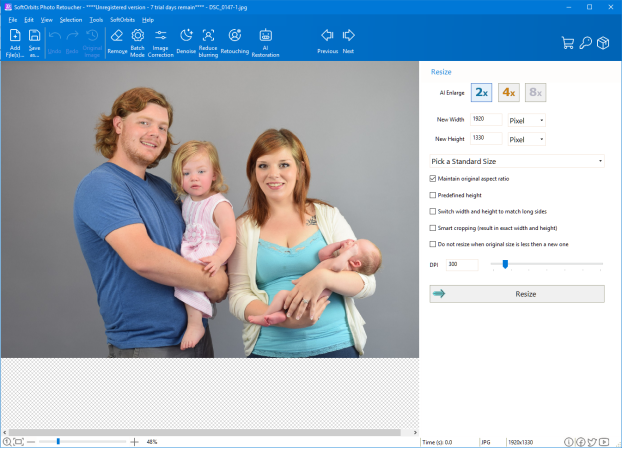
After preliminary processing, you can proceed to the AI capabilities. You can individually restore faces or denoise and unblur. Then go to the “Resize” option and use the “AI Enlarge” function. Besides the standardized options like 2x, 4x, and 8x, you can set the size of the desired image and specify additional options. There is also the possibility of setting the required DPI size.
“We developed our program to solve a wide range of tasks. Although many see the best results only through AI, we show that only by combining various best methods can you achieve the result you want. Try experimenting; old algorithms do not mean they are bad,” says SoftOrbits CEO Eugene Ustinenkov.
The address of the SoftOrbits company is located in Thailand: 9/19, Moo 7, Koh Phangan, Surat Thani 84280, Thailand.
Are you ready to future-proof your images? Download SoftOrbits Photo Retoucher today and turn blurry pictures into print-ready, perfect versions.
Take Control of Your Privacy Today!
Unblock websites, access streaming platforms, and bypass ISP monitoring.
Get FastestVPN
© Copyright 2026 Fastest VPN - All Rights Reserved.
Don’t Miss out this deal, it comes with Password Manager Free of cost.