


Get
93% Off!
on Lifetime Exclusive Deal
Don’t Miss out this deal, it comes with Password Manager Free of cost.

An online game can reload when you return to its tab because the browser has removed the page from working memory. The tab remains, but the running page does not. Selecting it again makes the browser load it afresh. This can happen without closing the tab or pressing Refresh, and it does not automatically mean the game failed, your connection dropped, or the website signed you out.
Firefox makes the distinction visible through its Unload Tab command. Mozilla’s December 2025 overview describes unloading inactive tabs while keeping them visible. The browser retains a way back to the page while releasing resources it was using. Other browser memory controls can make similar decisions automatically, so leaving a tab open is not a promise that its contents will keep running.
Working memory holds information the browser needs while a page runs. A game’s displayed controls, graphics, and changing information depend on more than the label at the top of the window. After unloading, that label can remain, even though the page needs to start loading again.
Simply switching tabs does not necessarily trigger unloading. A page can be hidden behind another tab and remain loaded. Whether the browser later releases it depends on the browser’s behaviour, settings, and available resources.
For casino pages, distinguish returning to the same address from returning to the same displayed moment. A tab open for Sportaza online casino is not a saved copy of a slot screen or live table. Its continued presence identifies the page you left open, without establishing whether the game view has stayed active while you were reading something in another tab.
Written game instructions and live casino video have different requirements. Reloading a rules page brings back information to read; a live table view needs current information from the service. The appearance after a reload also depends on how the website was built. Developers can save details such as a page’s scroll position and restore them later. A familiar game screen can therefore be rebuilt rather than kept continuously running, although the details restored vary by website.
Browsers can also freeze a background page, suspending certain work, such as page timers, while retaining it in memory. A frozen page can resume without a full reload. Unloading removes the running page instead. Neither operation acts as a pause button for a live casino table.
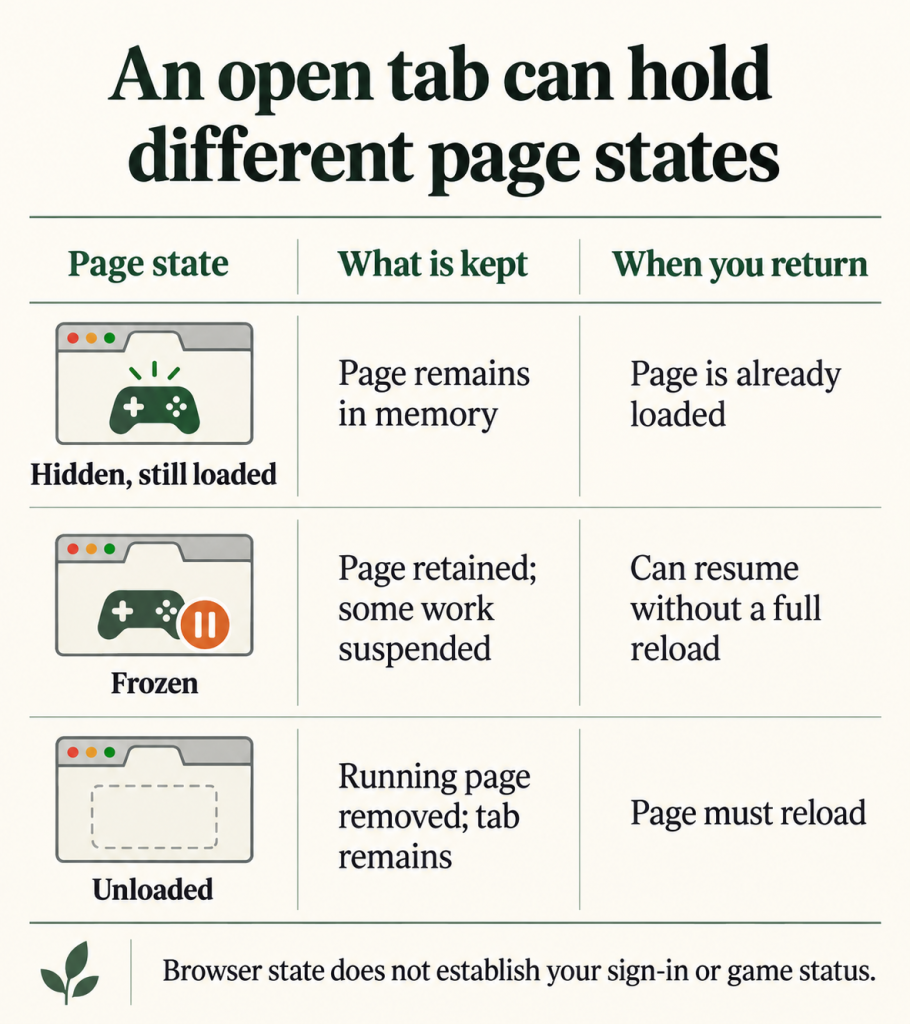
The browser manages the page on your device. The website separately handles information associated with your visit or account. A sign-in session is how a site recognizes you across requests, including requests made while loading another page.
A page may load afresh while the website still recognizes the signed-in user. Conversely, keeping the page loaded cannot guarantee that the site’s session will remain valid indefinitely. The presence of a tab is not evidence of either condition.
A casino game’s loading indicator is a clue about the display, rather than confirmation of what happened during the interruption. It cannot establish whether an earlier action was accepted or a round finished. Likewise, the return of a live table’s surrounding controls does not by itself confirm that its video connection has resumed. The game’s current messages and status information are needed to answer those questions.
Look at the wording as well as the animation. A request to sign in points to account access, whereas a message about reconnecting points to communication with the service. If only the game area appears to restart, describe that separately from the whole casino page reloading. These observations narrow the question without assuming a cause.
When the status of a casino round remains unclear, the game’s available information or the site’s help is the appropriate place to resolve it. A browser memory exemption concerns keeping the page loaded; it cannot verify an earlier game action. Keep those two questions separate when describing the problem.
Start with what the browser itself reports. In Firefox, manually unloading a tab greys out its icon, and selecting that tab reloads the page. That is a concrete indication of unloading. A loading animation inside a game, by itself, is less specific because it does not identify which part of the page is restarting.
For automatic behaviour, look for memory-saving controls in your browser’s settings. Vivaldi’s November 2025 release introduced Memory Saver settings with configurable exemptions. Its Performance section lets users adjust how aggressively inactive tabs are managed and configure tabs that should remain loaded, including pinned tabs.
An exemption can reduce unloading of a chosen page without applying that preference to every open tab. Keeping every tab loaded also keeps more resources occupied, so the choice depends on how much background content you want the browser to retain. Do not assume that pinning a tab creates the same exemption in every browser; check the controls available in the browser you actually use.
For a game page that reloads only after being left in the background, memory management is worth checking. For a game that remains visible but asks you to sign in again, the browser’s unloading controls may have nothing to change. Establish whether the page was unloaded, then address any separate message from the website. Keeping a tab open and keeping a game session continuous are different things.
Take Control of Your Privacy Today!
Unblock websites, access streaming platforms, and bypass ISP monitoring.
Get FastestVPN
© Copyright 2026 Fastest VPN - All Rights Reserved.
Don’t Miss out this deal, it comes with Password Manager Free of cost.