


Get
93% Off!
on Lifetime Exclusive Deal
Don’t Miss out this deal, it comes with Password Manager Free of cost.

Gmail Security is a must for all, whether you use it for personal or business communication. With so much sensitive data in your inbox, contacts, and financial information, losing access will be a nightmare. What’s worse? It could even put you at risk of fraud or identity theft.
This is the reason that keeping your Gmail protected against malware, hackers, and phishing activities is extremely crucial. Fortunately enough, it’s something that can easily be accomplished just by applying certain security protocols.
Just by activating the correct security and recovery measures, you will be in command of unsolicited access while being able to lock down your account. In this blog, I will walk you through the 7 best ways to boost your Gmail security and give you peace of mind. But, before that, first look at these warning signs of your Gmail security.
This is 2026, cyber attacks have evolved to be more advanced, and your Gmail account is an easy target. Whether it‘s phishing, unauthorized access, or stealthy data theft, the first step to safeguarding your information is identifying early warning signs. Take a look at these security warning signs you should never ignore. In case you notice any of them, take immediate action to secure your account.
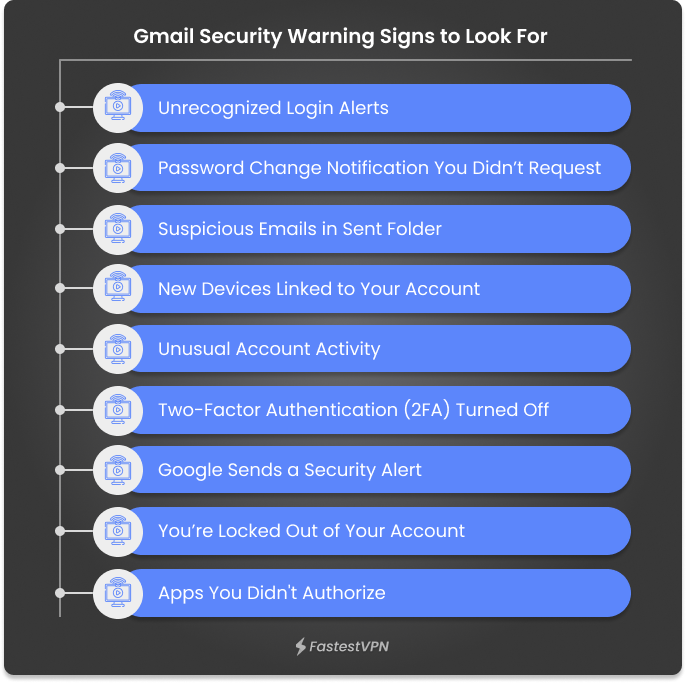
It’s not just about making your password strong to secure your Gmail account. It‘s more of making layers of defense. It entails turning on the two-factor authentication and monitoring what’s going on around your account, too. It’s with these 8 steps in Gmail security that you would be able to protect your inbox from hackers, phishing attacks, and other unauthorized access. Below are 8 must-do security checks to keep your Gmail account protected, personal, and entirely at your disposal this year.
Your initial defense against cyberattacks on your Gmail account is a strong and special password. Try to make it at least 16 characters long and with a combination of uppercase and lowercase letters, numbers, and special characters. Refrain from using common dictionary words or personal data in your password, like your birthday.
Make a Strong Password for Free
Each of your credentials must use a distinct, robust password. This is because of credential stuffing, where hackers attempt to use a stolen password to gain access to multiple accounts. It is usually effective because many users share the same password across various sites. Go to your Google account settings after you‘ve chosen a good, strong password. Under the “Security” tab, find the “How you sign in to Google” section. Click on “Password“ to change it to a stronger, more secure password.
Use a Password Manager
If you‘re employing long, complex passwords for all accounts, it might be difficult to recall them. This is where a password manager is useful. A password manager generates, stores, and autofills your account passwords securely. You only have to remember a single master password with this application, making it simpler to manage your security.
Turning on two-factor authentication (2FA) is one of the best methods of protecting your Gmail account. With 2FA enabled, login not only requires your password but also a second step of verification, such as a code that is sent to your phone or a prompt on your device. This second layer of security greatly minimizes the threat of hacking. Even if your password ends up in the wrong hands, they will not be able to get into your account without that second authentication factor.
Technology firms such as Google are constantly refining methods to provide users with more control over who can access their information. Although linking third-party applications to your Google account can be productive, it also presents possible risks—cybercriminals can use these connections to access your data.
To view the third-party apps your account is associated with, go to your Google Account > Security settings and scroll down to “Your connections to third-party apps & services.” From this screen, you can view and delete these associations.
It‘s a good idea to delete any programs you‘re not using, since unused or stale connections will make you more vulnerable. Also, in the “Your devices“ section, you can see all devices currently signed into your account. Keeping an eye on this list and deleting unknown or unused devices is another good idea to secure your Gmail.
Keep your browser, operating system, and programs updated at all times. It is essential to stay updated with the latest security threats and ensure that all the built-in security features work properly. These patches typically include large security fixes that address vulnerabilities discovered since the last release. Failure to update keeps your system at risk, and hackers get a chance to exploit vulnerabilities and access your Gmail or other sensitive information. Keeping your system up to date is one of the easiest and most effective ways of improving your digital security.
Phishing is a form of cyberattack. In this attack, any scammer acts like a trusted source, for example, like your bank, or a known company. In this way, the scammer tricks you into giving away sensitive information. For example, you might get an email that is from your bank asking you to verify your login credentials. These emails typically create a sense of urgency with threats, like “Your account will be locked unless you act now.” The primary intention is to hurry you into a hasty response without thinking.
Gmail users are a common target of phishing attacks. While Google scans for harmful content, some phishing emails can still bypass filters. That’s why it is important to stay alert. Always double-check who is contacting you.
For instance, your bank typically lists its official email addresses on its website. If you’re unsure, call them using the official contact number—not the one in the suspicious email. If you see any phishing messages in your email inbox, immediately report them. Simply open the suspicious email, click on the three vertical dots in the top-right corner of the message, and choose “Report phishing.” This assists Google in blocking such attacks in the future.
If you ever happen to forget your Gmail password, having a recovery email will enable you to recover it quickly. A recovery email is another email address that you designate to your account, and Google can use it to confirm your identity and assist you in recovering access.
To enable it, follow these steps:
This easy step helps to make sure that in case you get locked out, you‘ll have a safe and rapid means of restoring your account.
Google constantly scans your Gmail account for strange activity and will alert you if suspicious activity is found. This may include log-ins from unknown computers, an inordinately large amount of emails sent, or attempts to use stored passwords. When this kind of activity is detected, you will be alerted immediately. Be sure to read the alert carefully—verify information such as the device type, location, and access time. If anything appears out of place or suspicious, click the prompt to lock your account at once.
Google will walk you through updating your password and locking your data. If the activity was genuine and performed by you, you can validate it by choosing “Yes, it was me.” To remain secure, it is advisable to make a routine of periodically checking your account activity and ensuring there are no unauthorized logins or activities.
FastestVPN greatly improves your Gmail security by encrypting all your online traffic, keeping your sensitive information, such as passwords and verification codes, safe from hackers. It also conceals your IP address, making it more difficult for cyber attackers to trace your activity or send phishing scams your way. Using public Wi-Fi, FastestVPN sets up a safe tunnel, keeping you safe from dangers such as man-in-the-middle attacks. Additionally, it blocks malware, ads, and harmful trackers that could compromise your account.
FastestVPN ensures that whether you’re accessing Gmail from a desktop, tablet, or phone, your information stays safe and private, adding an extra layer of security alongside Gmail’s built-in features.
Hopefully, this blog has illustrated the necessity of keeping Gmail secure and how you can go about doing so to safeguard your account. With the number of threats escalating online, it’s essential that you remain proactive and alert. By keeping the security advice given, such as turning on two-factor authentication, having strong passwords, and keeping an eye on your account regularly, you can protect your Gmail from possible breaches and keep your personal and professional information safe. Be vigilant and keep your account secure!
Take Control of Your Privacy Today! Unblock websites, access streaming platforms, and bypass ISP monitoring.
Get FastestVPN
© Copyright 2026 Fastest VPN - All Rights Reserved.
Don’t Miss out this deal, it comes with Password Manager Free of cost.
