


Get
93% Off!
on Lifetime Exclusive Deal
Don’t Miss out this deal, it comes with Password Manager Free of cost.

Are you ready to give up your Pokémon hunt? Did you catch them all? This guide will show you how to delete your Pokémon Go account in a few simple steps! Uninstalling the Pokemon Go app will not delete your account and data, for this reason, you will need to manually delete your account.
Pokémon Go became popular over 4 years ago, and the hype created was fun and games, but there were a lot of threats around the game. The game went viral and hit Google Play and App Stores tenfold.
The success rates were steep, back when almost anyone could come out of their home and join the hunt. That could not be the case when the era of Covid took its toll, but this isn’t why users are deleting their Pokémon Go accounts.
Because the game involved users coming out of their houses, hunting for Pokémon almost everywhere, that in itself was a huge risk. As funny as this sounds, you’d find Pokémon hunters in various places; cafes, schools, parks, but it stretched too far.
You’d soon find players crashing funerals, weddings, hospitals, and more. The game brought on major injuries and several fatalities, where back in 2016, a man struck two pedestrians while driving – killing one. This was just one of the many incidents that took place.
Another reason why users should delete their Pokémon accounts is because of fake apps, scams, data logging, tracking, and more. So, if you’re one of the many who are not eager to catch them all, take a look below at how to delete your Pokémon Go account.
Before you delete your Pokémon GO account, make sure you know that once it’s terminated, you will not be able to reverse it. You will need to create an entirely new account, with a new email address and a new password.
Another thing to note is that you must remember the email and password you used to sign up for Pokémon GO. If you don’t have those details, you can’t delete your account.
We’ve highlighted the tutorials below based on your device, starting with:
When you uninstall the Pokemon Go app from your phone, it does not do much. All your data and information associated with the account is still stored on the Pokémon Go servers.
NOTE: For those who are still willing to keep their Pokemon Go accounts, make sure for privacy and security reasons, you connect to FastestVPN. We’ve got apps for Windows, Android and iOS. Plus, if Pokemon Go is not available where you’re located, you can always unblock games like these using FastestVPN.
Deleting a Pokemon Go account will only take up to a few days or weeks to process. However, note that when you delete the account, you will not be able to go back or restore it. You will need to use a new password, email and create a new account from scratch.
You can’t start a new game on Pokemon Go once you’ve terminated your account. However, you can re-play the game after creating a new account with new email and password details.
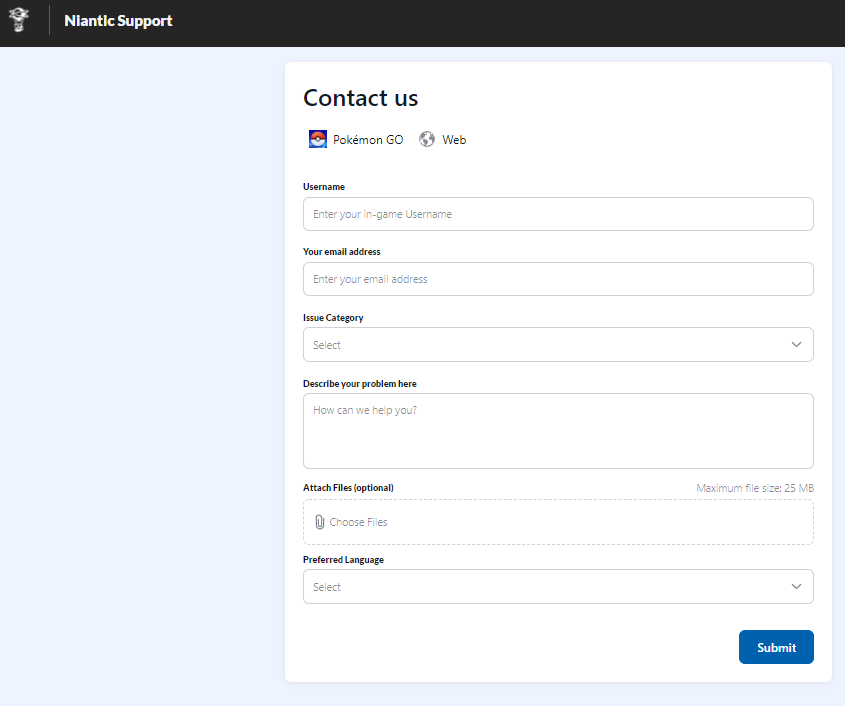
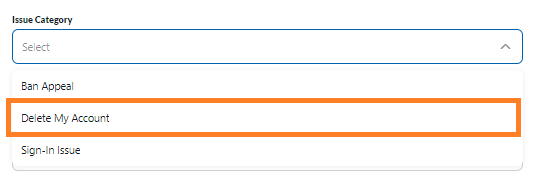
The good news is that you don’t need to delete all the information step by step. Once you delete Pokemon Go account, everything else gets deleted permanently along with it. Your account and information will be permanently wiped out. Just fill out the form on the Niantic support page and click on “Delete My Account.”
Yes, all old Pokemon accounts get closed after being inactive. However, before that happens, Niantic labs will notify you through email.
And that’s about it! You can either catch them all or learn how to delete a Pokemon account by following the tutorials above. Either way, the choice of termination is always yours, but make sure you run through the rules before deletion. This is because once you delete your account, you will not be able to restore it, nor create a new account using the same email and password.
© Copyright 2026 Fastest VPN - All Rights Reserved.
Don’t Miss out this deal, it comes with Password Manager Free of cost.
