


Get
93% Off!
on Lifetime Exclusive Deal
Don’t Miss out this deal, it comes with Password Manager Free of cost.

What is DNS cache? Have you heard of DNS cache poisoning? How do you flush DNS cache? This guide highlights answers to all your queries and ways to successfully execute them.
Your browser resolves a domain name in milliseconds, and you never notice. That speed depends on a small, temporary storage layer called the DNS cache.
However, that same layer becomes a target for one of the internet’s older attack techniques, and that is called DNS cache poisoning. This guide explains both concepts in plain technical terms, then shows you exactly how to flush the cache on any system.
A DNS cache is a temporary database that stores domain-to-IP mappings. It’s so your system does not query authoritative servers every time you visit a website.
When a resolver receives a query, it checks the cache first. If a valid record exists, the resolver returns it immediately. If not, it performs the full lookup and stores the answer for future use.
It happens at two distinct layers.
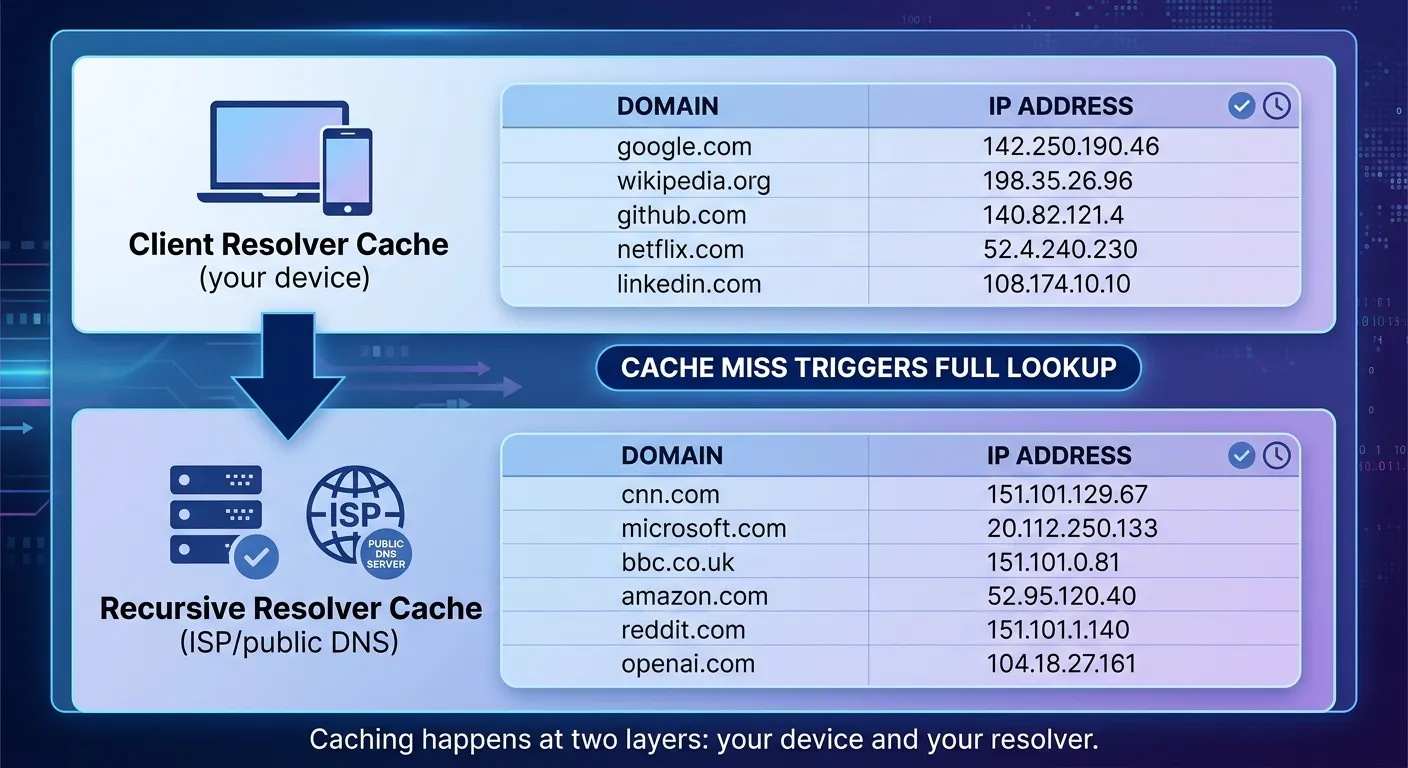
The client-side resolver cache sits on your operating system. Windows maintains it through the DNS Client service, and you can inspect it with ipconfig /displaydns. This cache holds records your device recently queried.
The recursive resolver cache sits on the DNS server your device points to, your ISP’s resolver, a public service like 1.1.1.1, or an internal corporate server.
This cache serves every client that queries that resolver, which makes it larger and far more consequential for security.
Every DNS record carries a Time to Live (TTL) value in seconds.
The TTL tells the resolver how long it may keep the record before discarding it and performing a fresh lookup. A TTL of 300 means the record stays cached for five minutes, and a TTL of 86400 means it stays for a full day.
Time to Live (TTL) creates a direct trade-off. Short TTLs propagate changes faster but generate more queries to authoritative servers. Long TTLs reduce load but slow down updates.
When you flush your DNS cache manually, you force the resolver to discard everything and start fresh.
DNS cache poisoning, also called DNS spoofing, is an attack in which someone corrupts a resolver’s cache by injecting false DNS records.
The resolver then returns the attacker’s IP address instead of the legitimate one. It redirects users to malicious infrastructure such as phishing pages or attacker-controlled proxies.
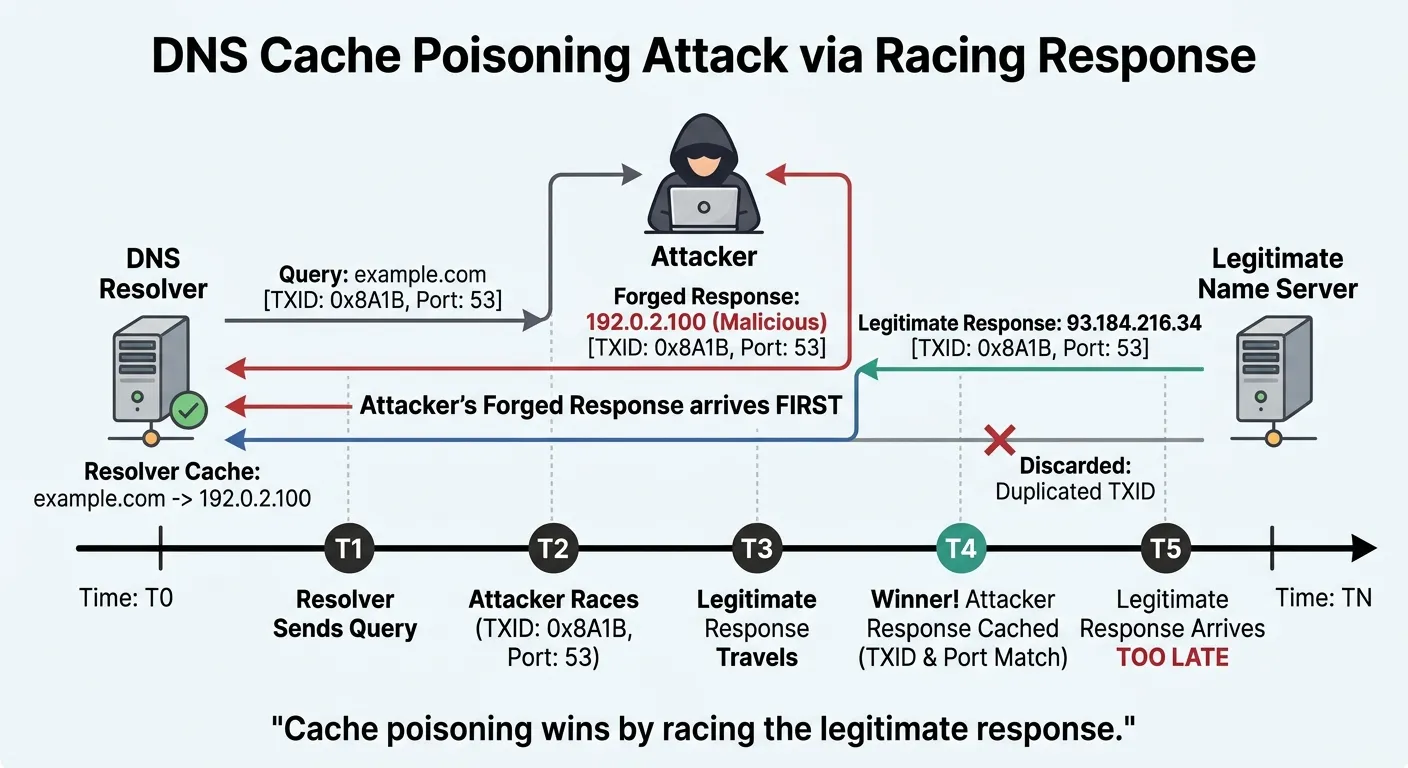
DNS queries typically travel over UDP, which has no handshake. Instead, the resolver validates a response by matching three values:
If all three match, the resolver accepts the response as legitimate.
An attacker exploiting this weakness must guess the TXID and the source port before the real authoritative server responds.
Older resolvers used predictable TXIDs and fixed source ports, making them easy to guess. Modern resolvers randomize both, so an attacker has far more entropy to overcome.
A more efficient variant is the birthday attack. Instead of guessing a single TXID, the attacker forces the resolver to open many simultaneous queries for the same domain.
After this, it then floods it with spoofed responses. With enough queries and responses, the probability of a collision rises dramatically, and a forged response gets accepted.
If an attacker poisons one resolver, every user behind it is affected. In 2015, attackers poisoned resolvers at Brazilian ISPs to send Boleto payment users to fake sites that stole their credentials.
The attackers couldn’t reach those resolvers from outside the ISP’s network. So, they broke into machines inside the network and used those to send the poisoning queries.
However, the defenses are simple but not always used. They only let trusted clients make recursive queries, randomize TXID and source port values. They also deployed DNSSEC to cryptographically verify responses.
Without DNSSEC, a resolver can’t tell a forged record from a real one if the attacker wins the race.
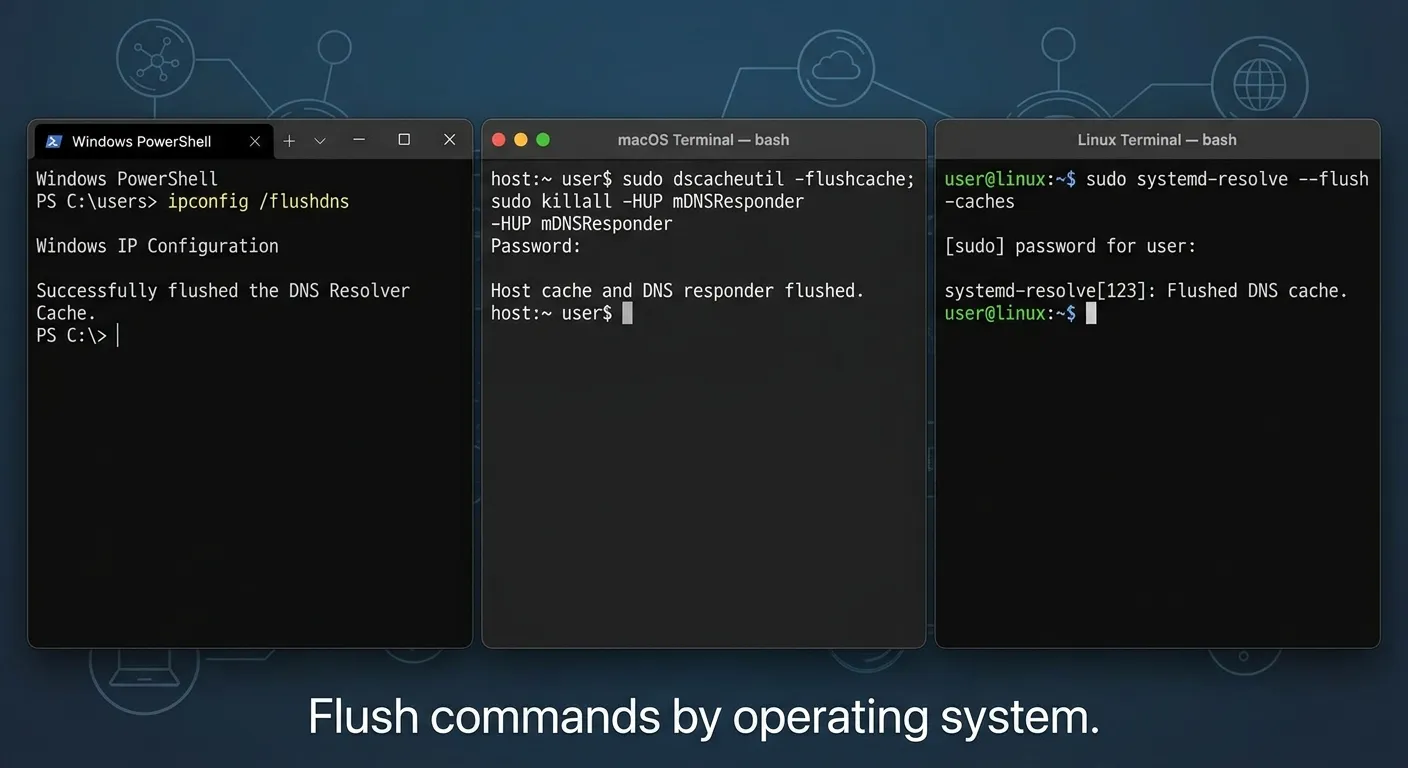
Flushing the cache clears stale or corrupted records and forces the resolver to fetch fresh answers.
CISA recommends flushing as a countermeasure against poisoned DNS lookups, though it notes that flushing destroys forensic artifacts. So, capture the cache first if you are investigating an incident.
Here’s how to flush DNS cache:
Here’s how to flush cache DNS on Windows:
text
ipconfig /flushdns
text
Clear-DnsServerCache
The command depends on your macOS version:
text
sudo dscacheutil -flushcache; sudo killall -HUP mDNSResponder
text
sudo resolvectl flush-caches
text
sudo systemctl restart nscd
text
sudo systemctl restart dnsmasq
When you flush DNS cache, it removes poisoned records from the local cache, but it does not prevent re-poisoning. If the resolver itself is vulnerable, the attacker can inject false records again. Flushing is a mitigation, not a fix. The durable fix is resolver hardening: restrict recursion, randomize TXID and port values, and enable DNSSEC. The browser cache stores web content, like HTML, images, and scripts, to speed up page loads. The DNS cache stores domain-to-IP mappings for faster connection setup. Flushing the DNS cache doesn’t clear browser content, and clearing browser cache doesn’t flush DNS records. Repeated corruption usually points to a vulnerable resolver, not your device. Check whether your router or ISP resolver restricts recursive queries to trusted clients. An open recursive resolver is a primary enabler of cache poisoning attacks. If you control the resolver, disable open recursion and enable DNSSEC validation. DNSSEC (Domain Name System Security Extensions) validation failures in resolver logs are the strongest signal, though misconfigured domains can produce false positives. You can also compare a cached response against the authoritative server's answer. However, you need DNSSEC enabled on the authoritative query to trust the comparison. Does flushing the DNS cache fix cache poisoning?
What is the difference between DNS cache and browser cache?
Why does my DNS cache keep getting corrupted?
Can DNS cache poisoning be detected?
Coming towards the end of this guide on “What is DNS” you know everything about it and also how to flush DNS cache.
The DNS cache exists to make resolution fast, and it works. DNS cache poisoning exploits the trust the resolver places in cached records: if an attacker can inject a false mapping, every user behind that resolver connects to the wrong destination.
Flushing the cache clears the damage on your device, but it does not close the vulnerability. Restrict recursion, randomize query identifiers, and deploy DNSSEC. Those three steps remove the conditions poisoning requires.
Take Control of Your Privacy Today! Unblock websites, access streaming platforms, and bypass ISP monitoring.
Get FastestVPN
© Copyright 2026 Fastest VPN - All Rights Reserved.
Don’t Miss out this deal, it comes with Password Manager Free of cost.