


Get
93% Off!
on Lifetime Exclusive Deal
Don’t Miss out this deal, it comes with Password Manager Free of cost.

There are many unofficial or unverified apps available for live streaming that cannot directly be accessed on FireTV. The same is the case with TheTVApp. However, there are still other ways for you to access them. In this guide, I’ll show you how to watch TheTVApp on FireStick via the FireTV browser and via TheTVApp Kodi addon. This guide supports all the popular FireTV devices, including Firestick Lite, FireStick HD, Fire TV Cube, Firestick 4K, Firestick 4K Max, and 3rd Gen Firestick.
Note: Whenever using third-party apps for FireStick or Kodi, always ensure that active precautionary measures are taken. There are many unofficial apps that are often not safe to use. Always consider accessing them with the help of the best VPN for FireTV or Kodi. With FastestVPN, you can easily and securely use any app you like, provided that your data and connection are safe.
| Feature | Details |
|---|---|
| Service Type | Live TV Streaming Website |
| App Availability | No Official FireStick App |
| Access Methods | Browser & Kodi Addon |
| Supported Devices | FireStick, Android TV, Kodi |
| Content | Live TV, Sports, PPV |
| Official Source | Unverified |
TheTVApp is not an application but is one of the best live TV streaming websites. It came in as one of the more popular alternative sites since the shutdown of USTVGO. It offers a number of live TV streams from some of the more renowned channels. A few of them include ACC Network, A&E, Animal Planet, BBC America, and many other options. Even though this service is available to stream on Firestick, Android TV Boxes, and a few other devices, there is no official app for it. To use it on your FireStick, you will need to use its website or via the Kodi addon.
As known by many streaming buffs, TheTVApp has always been a top choice for live TV channels. It offers more than 100 live TV channels to choose from, including Animal Planet, AMC, A&E, ESPN, and much more.
However, because TheTVApp is from an unverified source, it’s always good to be cautious. In terms of safety, the website is safe enough but still flagged as malicious by one security vendor. This was tested via a scan using the famous VirusTotal. Check the image tagged below showing you the results:
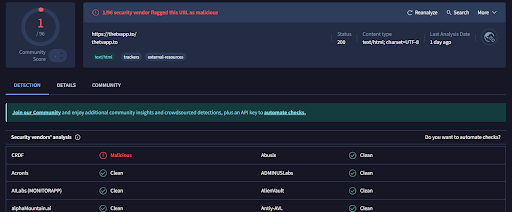
So, this goes to say to always test out a website before using it.
Now, coming down to whether TheTVApp is legal, it’s not. TheTVApp operates illegally as it streams live TV channels without the necessary licenses.
Unauthorized streaming of copyrighted content breaches intellectual property laws in various countries, including the U.S., where the Protecting Lawful Streaming Act of 2020 classifies large-scale unlicensed streaming as a felony.
However, this is the case for most Firestick apps or add-ons. If you are to access it, continue at your own risk, but ensure your data is secure with FastestVPN.
NOTE!
Before you head to the tutorials, you must know that this guide is only for informational purposes. FastestVPN does not own nor is affiliated with TheTVApp or any streaming add-ons that are highlighted on our website. Continue in your own accordance.
Now, as mentioned, TheTVApp does not have any official Firestick app, so for you to get access to it on your device, you need to either access it via your Firestick browser or use its add-on via Kodi. let’s get started:
Here is how to get started:
Since the official TheTVApp Kodi addon is no longer available, you will need to access it via the third-party repository called Diggz Repo. To begin that, you need to go through 3 steps. Let’s begin:
Here’s how you can do that:
As mentioned, since TheTVApp is unofficially available via the Diggz repository. Because of this, you need to install the repo first to get the add-on. Here’s how:
Here’s how:
There is no official app for Firestick, but you can watch it via the website and via its unofficial Kodi addon. To download or use TheTVApp on Android you will need to access it using the Android TV browser or installing TheTVApp Kodi addon. However, the website might be an easier solution. Yes, it is free. However, it also offers premium packages that allow more device connections and access to more live TV channels. No, you cannot install the app for free. You will need to get it via the unofficial app using a third-party Kodi addon.Is there a TheTVApp APK for Firestick?
Can you download TheTVApp on Android?
Is TheTVApp free to watch?
Can I install TheTVApp Firestick app for free?
And that’s a wrap! You can now watch TheTVApp on Firestick using the two foolproof methods. However, as mentioned, third-party apps are not always the safest to access. For this reason, we always recommend going for secure and premium Live TV or streaming apps. If, however, you’re still going for TheTVApp, we recommend using FastestVPN with it. It comes with an app for Firestick that highly encrypts your connection, secures your data, keeps you private, and hides your physical IP address.
Take Control of Your Privacy Today!Unblock websites, access streaming platforms, and bypass ISP monitoring.
Get FastestVPN
© Copyright 2026 Fastest VPN - All Rights Reserved.
Don’t Miss out this deal, it comes with Password Manager Free of cost.