


Get
93% Off!
on Lifetime Exclusive Deal
Don’t Miss out this deal, it comes with Password Manager Free of cost.

Universal Plug and Play sounds helpful, and it is in many ways. It lets devices on your home network find each other and connect without you lifting a finger. But there’s a catch. That same convenience opens doors you might not want opened. This guide breaks down everything on “what is UPnP”, why it’s dangerous, and what you can do about it.
UPnP stands for Universal Plug and Play. It’s a protocol that lets devices on the same network automatically discover each other. It configures connections without manual setup.
Let’s think about it in another simple way. You bring home a new gaming console, plug it in, connect it to your Wi-Fi, and it just works. You don’t need to log into your router and tweak the settings. That is exactly UPnP doing its job.
The same thing happens with smart TVs, security cameras, printers, and voice assistants. UPnP handles the technical stuff behind the scenes so you never have to.
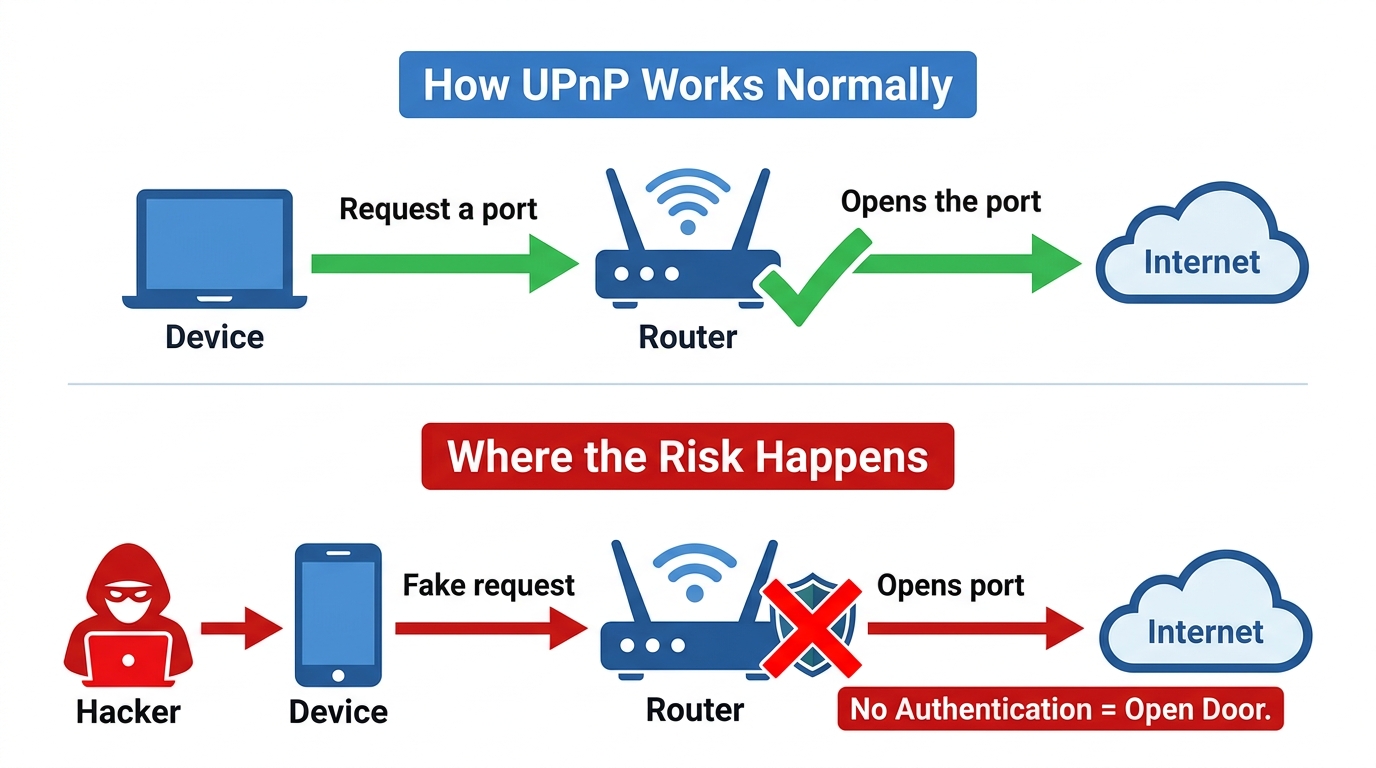
When a device needs to communicate with the internet, it asks your router to open a specific port. UPnP processes that request automatically. The router opens the door, and the device connects.
It doesn’t require any authentication; no approval from you. The router trusts that any device connected to your local network is safe.
UPnP follows a simple process:
When a device needs a port open, it sends a request during this process. The router opens the port without asking you. That’s the part that creates risk.
In short, no, UPnP is not safe, as it has no built-in authentication. That means any device on your network can request port access without your knowledge.
Here’s where the risk becomes real. If a hacker compromises one device on your network, they can use UPnP to open ports on your router.
They can then reach other devices, install malware, or use your network for criminal activity.
Even the UK government’s security team warned that UPnP can expose internal services like IP cameras and printers to the internet. It can also bypass your firewall rules entirely.
Recent vulnerabilities show how serious this is and how intense it can get.
In 2026, researchers found a flaw in a Calix router that let remote attackers modify port forwarding rules without authentication.
Another flaw in a Mercusys router let an attacker on someone’s local network expose their router’s admin panel to the internet with a single request.
Apart from UPnP security risks, it makes several things easier. Here’s where you’ll notice it most or how it’s used:
| Use case | What UPnP does |
| Online gaming | Opens ports for Xbox, PlayStation, and PC games |
| Media streaming | Enables Plex, DLNA, and other media servers. |
| Smart home devices | Lets cameras, thermostats, and plugs connect remotely. |
| Peer-to-peer apps | Helps file-sharing apps establish direct connections. |
UPnP relies on standard protocols like HTTP, TCP/IP, and DHCP. These protocols handle the communication between devices. When a device requests a port, it uses one of these protocols to reach your router.
So, if you disable UPnP, some of these things will stop working. You’ll see error messages like “UPnP Not Successful” or “NAT Type: Strict” on your gaming console.
However, for security benefits, you should always weigh your options on whether to disable or enable UPnP.
Let’s weigh in:
For most people, the simplest answer is to disable it. If you don’t game online, run a media server, and don’t need remote access to smart home devices, there’s no reason to leave UPnP on. Disabling it removes a potential security hole with no real downside.
If you need UPnP for gaming or smart home features, you can keep it enabled. However, the extra steps to secure your network are worth it. For the best results, update your router firmware, use a strong Wi-Fi password, and monitor connected devices.
If you are disabling UPnP, there are two main alternatives you can consider:
As mentioned, if UPnP is a security risk, you should disable it. The steps below vary by router brand, but are instructions for the most common ones:
If you’re using a router other than the two listed above, look for a section labeled “Advanced,” “NAT,” or “NAT Forwarding.” UPnP is usually a single toggle in one of those menus. If you can’t find it, check your router manufacturer’s support page.
If you’re not sure whether UPnP is on, you can check from your router’s admin panel. Look for a UPnP Portmap Table. It shows you which devices have opened ports and which ports are currently active.
If you see devices or ports you don’t recognize, that’s a red flag. Upon seeing that, disable UPnP immediately and investigate.
Disabling UPnP might close one door, but it doesn’t solve everything. Your network traffic is still visible to your ISP. Also, if you’re away from home or on the go, you can’t access your devices securely.
Here’s where a VPN router solves both problems.
When you set up a VPN on your router, every device on your network is encrypted. This includes your smartphones, smart TV, gaming console, security cameras, etc., all of which route through the VPN tunnel. Your internet provider can’t see what you’re doing. Hackers can’t intercept your traffic.
A few routers, like ASUS models, come with built-in VPN client support. You just log into the router admin portal, go to the VPN section, and upload your VPN configuration file. Once connected, your entire network is protected.
This is especially useful for devices that don’t support VPN apps natively. Your smart TV probably doesn’t have a VPN app. But if your router runs the VPN, and you connect your TV to the router WiFI, it’s automatically secured.
UPnP is convenient but risky. It has no authentication, so any device on your network can open ports without your knowledge and approval. If you’re someone who’s mostly home or working remotely, disabling UPnP is the safer choice. If you game online, UPnP makes life easier. It automatically opens the ports your console needs. Without it, you'll need to set up manual port forwarding, or you'll get a "Strict" NAT type that limits who you can play with. If you don't use UPnP-dependent features, nothing happens. If you do game online or use smart home devices, some features may stop workin when you disable UPnP. You'll need to set up manual port forwarding to restore them. Yes, they can if they compromise one device on your network. Through that, they can use UPnP to open ports on your router. This gives them access to other devices on the same network and lets them use your network for malicious activity. Sign in to your router's admin panel and go to the UPnP section. If you see a toggle that's turned on, UPnP is enabled. You can also check the “UPnP Portmap Table” to see which devices have opened ports. No, it doesn’t replace it. A VPN protects your traffic from interception, but doesn't stop UPnP from opening ports on your router. You should still disable UPnP if you don't need it. For the best protection and results, use both a VPN and disable UPnP. Is UPnP safe?
Should I enable UPnP for gaming?
What happens if I disable UPnP?
Can hackers use UPnP to access my network?
How do I know if UPnP is enabled on my router?
Does a VPN replace the need to disable UPnP?
So, what is UPnP? It’s a convenience feature that comes with real security trade-offs. It makes devices connect easily, but it also opens doors that hackers can exploit.
For most people, disabling UPnP is the smart move. If you need it for gaming or smart home devices, keep your router firmware updated and monitor your network for unusual activity.
And if you want all-round protection, set up a VPN on your router. That way, every device on your network gets encrypted, and your internet provider can’t see what you’re doing.
Take Control of Your Privacy Today! Unblock websites, access streaming platforms, and bypass ISP monitoring.
Get FastestVPN
© Copyright 2026 Fastest VPN - All Rights Reserved.
Don’t Miss out this deal, it comes with Password Manager Free of cost.
[…] What is UPnP and Why You Need to Turn it Off […]