


Get
93% Off!
on Lifetime Exclusive Deal
Don’t Miss out this deal, it comes with Password Manager Free of cost.

Have you ever dug into your router settings and spotted “VPN Passthrough” hidden in a security menu? If yes, you’ve probably wondered what it does and whether you should touch it.
Most people ignore it because not everyone understands it, and some prefer not knowing. Some enable it thinking it will make their VPN faster or more secure. However, neither conclusion is accurate.
For this purpose, this guide explains what VPN passthrough is, why it exists, whether you need it, and how to configure it properly on your router.
VPN passthrough is basically a router setting. It lets you allow VPN traffic to pass through the router’s firewall and NAT (Network Address Translation) system without being blocked.
It doesn’t create a VPN connection, doesn’t encrypt your data, and doesn’t hide your IP address. So, it simply lets VPN traffic from a device on your network reach an external VPN server.
For a more non-technical explanation, you can think of it as a security guard. He’s been given orders to let anyone with a VPN badge pass through. So, the guard isn’t providing the VPN; they’re just not standing in its way.
If you’re still confused about why passthrough is needed, you first need to understand what NAT does. Let’s dive in:
Your home router uses NAT to let multiple devices share a single public IP address. So, when your laptop sends a request to the internet, the router swaps your device’s private IP. It exchanges it with a public one, sends the request out, and then routes the response back to your laptop.
To do this, NAT relies on port numbers. Every outgoing request gets tagged with a port number. This way, the router knows which device the response belongs to when it comes back.
So, what’s the issue here?
Some older VPN protocols don’t use standard port numbers. PPTP, for example, uses GRE (Generic Routing Encapsulation). This doesn’t have port numbers at all. When NAT sees GRE traffic with no port information, it doesn’t know what to do with it. The traffic gets dropped, and your VPN connection fails.
VPN passthrough solves this by telling the router how to handle these older protocols.
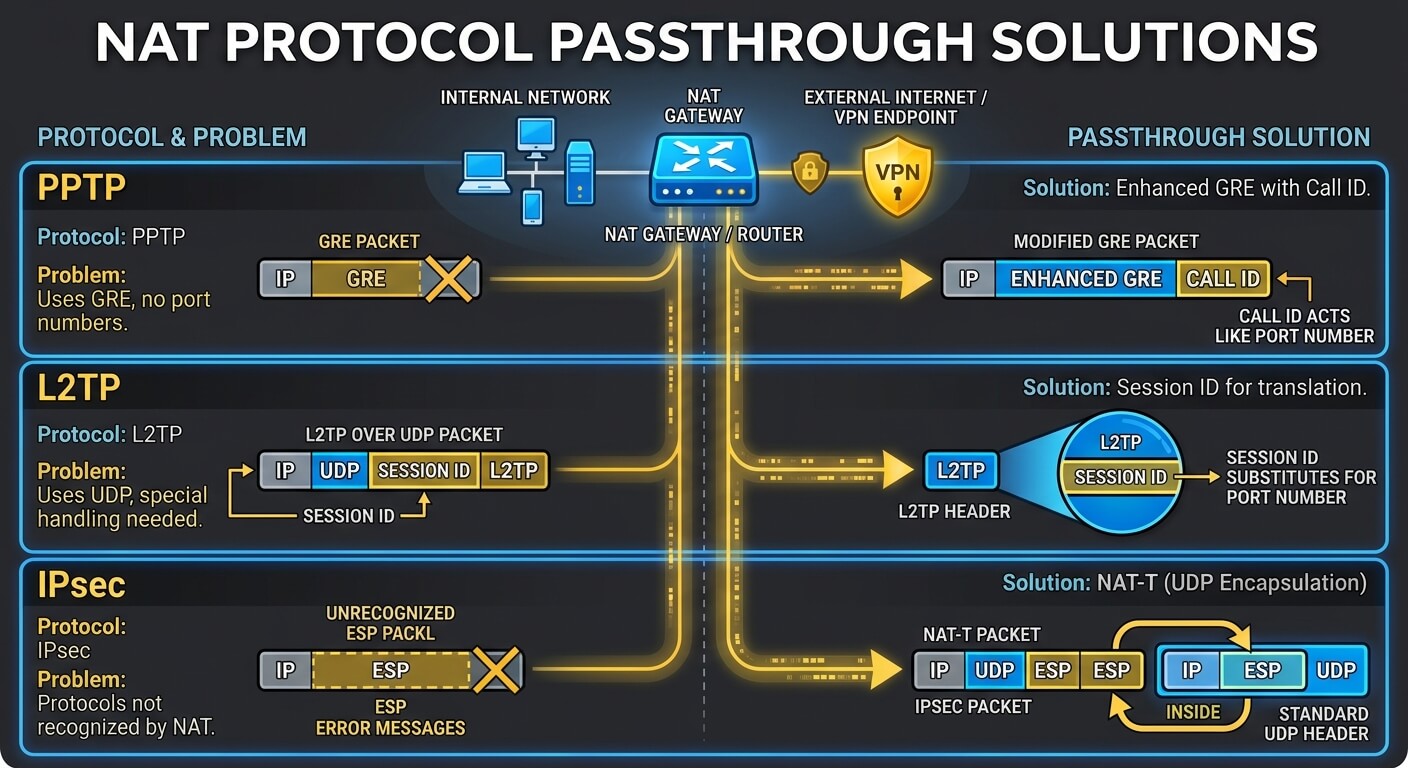
Protocol | The Problem | Passthrough Solution |
| PPTP | Uses GRE, which has no port numbers. | Enhanced GRE includes a Call ID that acts like a port number. |
| L2TP | Uses UDP but needs special handling. | Session ID substitutes for a port number. |
| IPsec | Uses protocols NAT doesn’t recognize. | NAT-T wraps IPsec packets inside standard UDP packets. |
Most routers that support VPN passthrough offer three separate toggles. These include:
PPTP, or Point-to-Point Tunneling Protocol, is one of the oldest VPN protocols. It uses GRE to encapsulate data, which NAT struggles with.
PPTP passthrough modifies GRE to include a Call ID that functions like a port number. This allows NAT to route the traffic correctly.
TECHNICAL WARNING: PPTP is considered obsolete and insecure. It uses weak encryption (MS-CHAP v2) that can be cracked. If you’re still using PPTP, you should switch to a modern protocol.
Next is L2TP Passthrough, which is often paired with IPsec for encryption. It uses a Session ID that acts as a substitute for a port number, allowing NAT to track the connection. L2TP passthrough enables this handling.
SECURITY NOTE: L2TP/IPsec is more secure than PPTP but is slower and less efficient than modern alternatives like WireGuard or OpenVPN.
IPsec (Internet Protocol Security) is a suite of protocols used to secure internet communications. It doesn’t natively work with NAT because it encrypts the packet headers that NAT needs to read.
IPsec passthrough solves this using NAT-T, or NAT Traversal. This means it wraps IPsec packets inside standard UDP packets. NAT can read the UDP header, assign a port number, and route the traffic correctly.
PLEASE NOTE: IPsec is still widely used in corporate VPNs and is considered secure when configured properly.
No, you don’t actually need it, and here are a few reasons why:
There are a few situations where VPN pass through is still relevant:
However, if none of these apply to you, you can safely leave VPN pass through alone. Alternately, disable it for better security. We’ve covered some security risks below.
Even though VPN passthrough itself isn’t dangerous, leaving it enabled when you don’t need it does have a few security risks. Take a look below:
If you’re using FastestVPN or any modern-day provider that has WireGuard, OpenVPN, or IKEv2, you can safely disable VPN passthrough on your router. This closes off legacy protocol handling that you don’t need.
However, if you’re using PPTP or L2TP/IPsec for a specific reason, like a corporate VPN, leave passthrough enabled for those protocols but disable the ones you don’t use.
These steps vary by router manufacturer; however, the general process is the same.
First, sign in to your router’s admin panel:
Common addresses are 192.168.1.1, 192.168.0.1, or 192.168.2.1. Check your router’s manual if none of these work.
However, the exact location varies.
Lastly, the router may reboot.
Here are a few Router brands and where to find their Passthrough options:
| Router brand | Where to locate VPN Passthrough |
| TP-Link | Advanced > Security > VPN Passthrough |
| Netgear | Advanced > Advanced Setup > VPN Passthrough |
| Asus | WAN > NAT Passthrough |
| Linksys | Security > VPN Passthrough |
Have you heard of these three terms and often get them confused? Here’s what sets them apart:
| Feature | VPN Passthrough | VPN Client | VPN Router |
| What it does | Lets VPN traffic through the router | Encrypts traffic for one device | Encrypts all traffic for all connected devices |
| Where it’s configured | Router settings | Installed on your device | Router settings |
| Does it encrypt? | No | Yes | Yes |
| Does it hide your IP? | No | Yes | Yes |
| Best for | Legacy protocol compatibility | Individual device protection | Whole-home protection |
PLEASE NOTE – VPN passthrough is not a substitute for a VPN. It’s just a compatibility feature for older protocols.
No, they’re completely different. VPN passthrough is a router setting that allows VPN traffic to pass through. It does not create a VPN connection or provide any encryption. If you’re leaning more towards securing your traffic, you need a VPN app. No, you don’t. FastestVPN uses modern protocols like OpenVPN, IKEv2, and WireGuard, which are NAT-compatible and don't require passthrough. You can leave passthrough disabled. No, it won’t. Passthrough doesn't affect speed. It only determines whether certain older protocols are allowed through your router. If your VPN is slow, it’s because of something else. Yes, it is safe. So, if you’re not using PPTP, L2TP, or IPsec, disabling passthrough is actually more secure. It closes off handling for outdated protocols. If your VPN happens to stop working after disabling passthrough, you're most likely using an old protocol that requires it. So, check your VPN app's settings and switch to WireGuard, OpenVPN, or IKEv2. If you must use a legacy protocol, re-enable the relevant passthrough option. No, it can’t and doesn't leak data. However, if your VPN connection drops and isn't configured with a kill switch, your traffic could be exposed. Passthrough itself isn't the issue. Is VPN pass through the same as a VPN?
Do I need to enable VPN passthrough for FastestVPN?
Will enabling VPN passthrough make my VPN faster?
Is it safe to disable VPN passthrough?
What happens if I disable VPN passthrough and my VPN stops working?
Can VPN passthrough leak my data?
VPN passthrough is an old router setting or a compatibility feature. It’s designed to solve a specific problem, which is helping older VPN protocols work with NAT.
However, as mentioned, in 2026, it’s not really necessary. Modern protocols handle NAT natively, and modern routers have passthrough enabled by default anyway.
If you’re using FastestVPN, you don’t need to touch passthrough at all. Our apps use IKEv2, OpenVPN, and WireGuard, all of which work seamlessly. There’s no need for any router configuration with it.
However, if you’re troubleshooting an old VPN setup or connecting to a corporate network that uses old protocols, passthrough is there when you need it.
Lastly, remember that it’s a compatibility feature, not a security feature. Your actual protection comes from the VPN itself.
Take Control of Your Privacy Today! Unblock websites, access streaming platforms, and bypass ISP monitoring.
Get FastestVPN
© Copyright 2026 Fastest VPN - All Rights Reserved.
Don’t Miss out this deal, it comes with Password Manager Free of cost.