


Get
93% Off!
on Lifetime Exclusive Deal
Don’t Miss out this deal, it comes with Password Manager Free of cost.

Can you really browse anonymously? One way or another, your information is bound to leak out. Sometimes it’s your ISP spying on you, the black hats fishing for your data for monetary gains, or some third-party monitoring your activities for targeted ads.
Online privacy and security may seem long dead and buried. But, it isn’t. Premium VPNs offer features utilized at the state level to protect information. For example, using FastestVPN is one way to browse anonymously. However, there are a few other reliable methods that help surf the internet anonymously.
This guide will walk you through the best methods to browse the web anonymously, which method offers the highest level of anonymity, and wrap up with the FAQs. Let’s dive in!
Anonymous browsing is when you surf the internet without revealing your identity or location. Your IP address is your digital address. And, it shows to your ISP or any third party when your browse the web. Once you connect to a VPN server, your IP address shows as the server you’ve connected to. TOR, proxies, and private search engines are other ways to browse anonymously.
Trends are changing. As accessible as the internet seems, the lingering cyber threats are real. And 9/10 Americans now consider online privacy a significant issue. This is why most people are rooting for anonymous browsing options. This guide covers reliable ways to browse the internet anonymously:
Connecting to a VPN is the most reliable method to anonymously browse the internet. VPNs offer a list of servers; connecting to them gives you a new virtual IP address. Once you get a new IP, your ISP or other third parties can’t trace your identity or location.
VPNs don’t only ensure anonymity, but privacy and security as well. We recommend using FastestVPN when torrenting, gaming online, streaming, and browsing. You also get AES 256-bit encryption and other premium features for elevated security.
Using a proxy is good for basic online anonymity. It works as an intermediary and hides your IP address from the sites you visit. Proxies are often used for bypassing geo-restrictions rather than for anonymity.
This is why a VPN might be a better option. The proxy only redirects your browsing traffic. Whereas a VPN encrypts it and offers enhanced privacy and security. It offers better security from the ISP and potential hackers on public networks.
The TOR (The Onion Router) browser is designed for anonymous browsing. Similar to an onion, the browser features a unique, multi-layer design focused on privacy. TOR encrypts and relays you internet traffic through 3 random volunteer-run servers (nodes) called a Guard, Middle, and an Exit.
Each relay only knows the immediate relay before and after it. This way, no single relay knows the origin and destination. Simply put, TOR anonymizes where your traffic goes and what your machine looks like.
Ever wondered why Google keeps asking you to log in whenever you’re logged out? Logging in to an account enables Google to snoop on you. This is why we recommend connecting to a VPN when using Google. Or, simply stay logged out to browse the internet anonymously.
When you’re logged out, Google doesn’t track your information, such as location, browsing activities, and the sites you visit. Google uses this information for targeted ads. If you don’t want your data to be visible to Google as well, it’s best to log out of it. And, using a VPN along helps protect your anonymity better.
Software updates offer patches and bug fixes. Once the vulnerabilities are patched, you’re on the safer side. Otherwise, the black hats might try to steal your information, and it’s easier without the updates. We recommend installing the updates to improve your online safety and privacy.
You might have given random permissions to Google that enable it to access your personal information. For example, your location access. We recommend going to Google’s permissions and accessibility. Disable access to options that you don’t need.
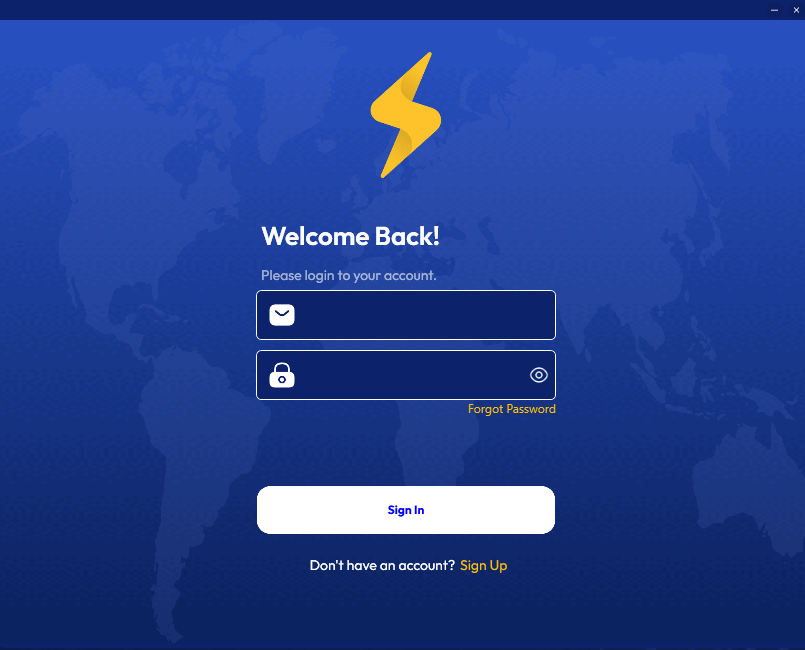
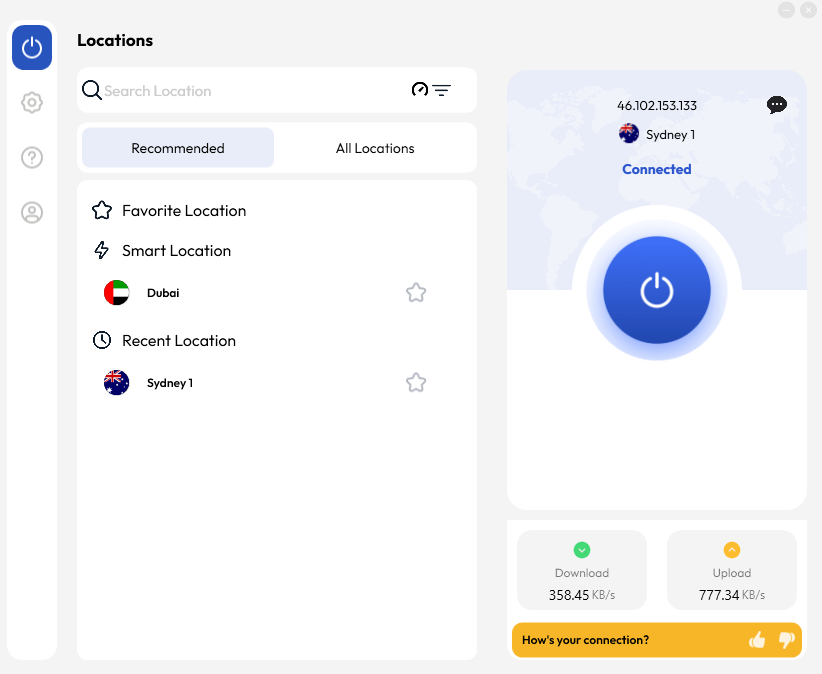
We recommend FastestVPN for 100% anonymity. Before proceeding with this tutorial, look up your IP address. Go to Browser > search What is My IP > Note down the IP address visible. Once done, follow these steps to use FastestVPN to browse the internet anonymously:
No, the TOR browser isn’t illegal in most countries. The web browser aims to offer ultimate anonymity. It runs via a volunteer-run network of servers, called the onion router. The goal is to conceal your identity and browsing activities from third parties.
Browsers are services that are often illegal when they aid malicious activities. Whereas the TOR browser primarily aims to improve online privacy and security. It’s among the best methods to maintain online anonymity.
Safari browser isn’t truly anonymous. It offers a certain level of local privacy, but it isn’t completely anonymous. The good part is: it doesn’t save history, and it isolates cookies. However, Safari’s Private browsing doesn’t hide your IP address. Your ISP can still see your IP address and location.
Websites and social media sites can still track your activities. In a nutshell, private browsing is a way to hide your activity from other people who use your device. It doesn’t make you completely anonymous to the internet.
Online privacy is now a state-level consideration. According to Pew Research, there is a major bipartisan support for enhanced personal information protection regulations. And, browsing the web anonymously is the first step to online privacy and security protection.
Tech advancements haven’t only made the internet more accessible but also made it easier for black hats to steal user information for monetary gains. The reasons are never-ending, but here are the top 3 reasons why you must anonymously browse the web:
Anonymously browsing the web is among the best ways to avoid being tracked by advertisers, websites, and cookies. Doing so prevents targeted ads, price differences, and data theft. Going anonymous online hides your IP address, which prevents location-based tracking.
Your IP address is your online address; anyone can find you through your IP. However, connecting to a VPN gives you a new IP address based on the server you connect to. Without an original IP address, you’re anonymous online. Meaning, no third party or black hat can trace your activities or location online.
If you choose a VPN to go anonymous online, FastestVPN offers premium privacy and security features that provide military-grade protection. All your data is encrypted and inaccessible to everyone.
Geo-restrictions limit information accessibility online. Websites, online services, and others are often only accessible in certain regions. However, when you’re anonymous online, nobody knows your location. You can then access the web without geo-limits or censorship, since your ISP doesn’t know your location to impose any limitations.
Debunking the myth: 100% browsing anonymity exists. There are various methods to remain anonymous online, or limit activity monitoring. And, using a VPN stands out as the most recommended method to browse 100% privately.
FastestVPN offers 800+ servers in 49+ countries and 100+ locations. You can connect to any of the 800+ servers, and your IP address changes according to it. Since your original IP address is hidden and all browsing activities are encrypted, no third party spies on you when browsing the web anonymously.
You can connect to FastestVPN to browse the Internet anonymously on phone. Google and other browsers offer an Incognito mode for browsing the web anonymously. Go to Google Browser > Menu icon > incognito tab.
You can browse LinkedIn anonymously. Go to Settings & Privacy > Visibility > Profile Viewing Options > Private mode. This ensures that your name and profile information are not visible to other profiles when you view them.
We recommend using FastestVPN to browse the internet anonymously without being tracked. Go to FastestVPN > Pricing > Get the VPN > Install the app > Login > Connect to a Server. Once connected, go to What is my IP? And confirm if you’re connected to the VPN for browsing the web anonymously.
You can anonymously browse the web via the Incognito version. Here’s how to enable Incognito mode on Google for browsing the web anonymously:
Breaking the myth: anonymous browsing exists. Using FastestVPN is the foolproof method of gaining 100% online anonymity and leveraging ultimate data security and privacy. We recommend using FastestVPN for its features. To further prove that, we also ran an IP leak test to see if you’re anonymous online.
FastestVPN features a no-logs policy. Meaning, we do not save your information, except your name and email. This ensures your browsing activities are 100% anonymous. To try FastestVPN out, get a 30-day money-back guarantee and test the features today!
© Copyright 2026 Fastest VPN - All Rights Reserved.
Don’t Miss out this deal, it comes with Password Manager Free of cost.
